03 of 03
Hostel leave management software
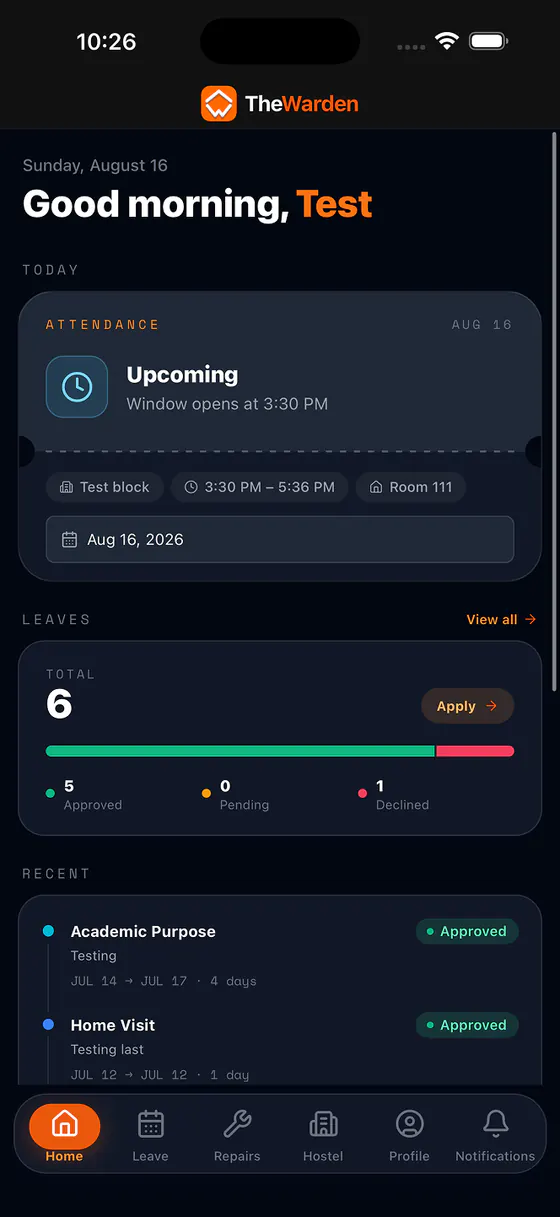
Students apply from their phone. The warden responsible reviews it. Everyone can see where it stands, and attendance already knows who is away.
What is hostel leave management software?
Hostel leave management software handles a resident's request to be away from the hostel and the warden's decision on it. In The Warden a student applies from the app with dates, a leave type, and a reason; a staff member with leave approval reviews it; and the outcome is visible to the student and counted in attendance.
More detail
The point is not the form. It is that the approval and the nightly headcount are the same record, so nobody has to tell attendance that a student is at home, and nobody has to defend two versions of who was away in March.
How does a student apply for leave?
From the app, on Android, iPhone, or the web. The student picks a start and end date, a leave type — home visit, medical, family emergency, academic, personal, or other — and gives a reason. The request lands in the queue for the staff who handle that block.
More detail
A request that overlaps dates the student already has pending or approved is refused at submission, so the same days cannot be claimed twice under two reasons. Leave also cannot start in the past, and leave starting today has to begin before that block's attendance window opens — otherwise a student who had already missed the punch could turn an absence into leave after the fact.
Who can approve hostel leave?
Whichever staff you give leave approval to — typically a warden, an assistant warden, or both. It is a permission rather than a job title, so an institution that wants one person approving and another only watching can have exactly that.
More detail
Staff see the requests for the blocks they are responsible for, on the dashboard and in the app, instead of fielding them across phone calls, messages, and a register at the gate. Each approval or rejection is recorded against the person who made it.
What statuses does a leave request have?
Pending, approved, rejected, or cancelled. A student can withdraw their own request while it is still pending, but not after a decision has been made. Every request stays in the student's history with its dates, its type, and its outcome.
More detail
Because the status is visible in the app, the question that used to be asked at the office door — has it been signed yet — is answered without anyone walking anywhere. Staff stop repeating the same answer, and students stop guessing.
How does approved leave affect attendance?
Approved leave becomes a third count in the day's attendance, next to present and absent, and the attendance percentage is worked out against the students who were actually expected back. A student at home on approved leave is never reported as missing.
More detail
Wardens can also see who is away today and tomorrow, hostel by hostel, which is the version of the question that matters at nine in the evening rather than at the end of the month.
What happens to old leave requests?
They can be archived. On a retention window you choose, older leave and maintenance requests are gathered into a monthly report and removed from the live tables, so the day-to-day views stay about the current term. This is configurable, and it depends on the report storage being set up for your deployment.
More detail
Until that is configured, nothing is deleted. The archive exists so that a hostel that has been running for years is not searching through four years of settled requests to find this week's, not to make records disappear.
How does it work, step by step?
- 01The student applies
- 02It reaches the right staff
- 03A warden decides
- 04The student sees the outcome
- 05Attendance is told
- 06Old requests are archived
What does it work with?
Leave management shares the same student record as everything else in the hostel.
Who is it for?
- Wardens approving leave between other duties
- Students who currently have to find a warden in person
- Hostels reconciling a gate register against a nightly headcount
- Offices asked, later, who was on leave and who signed it
In a walkthrough, we’ll show you
- A leave request from the student app
- Review by the warden responsible
- How it shows on the day's attendance
Common questions
01Can students apply for leave from their phone?
Yes. On Android, iPhone, or the web.
02Who approves leave?
Whoever you give leave approval to: a warden, an assistant warden, or both. It is a permission, not a fixed role.
03Can a student cancel a leave request?
Yes, while it is still pending. Once it has been approved or rejected, the decision stands and stays in the student's history.
04Can a student apply twice for the same dates?
No. A request that overlaps dates they already have pending or approved is refused when they submit it.
05What kinds of leave can students apply for?
Home visit, medical leave, family emergency, academic purpose, personal purpose, or other. The reason is written in by the student.
06Can parents see their child's leave?
Yes, read-only. A parent account sees the students linked to it and can view their leave and attendance. It cannot approve anything.